Pickup Dispatch is a cloud platform that runs the whole operation of a chauffeured transportation company: reservations, dispatch, drivers, vehicles, rates, customers and billing in one place. It is built for limo and black car operators, chauffeured transportation companies and airport transfer specialists of any size.
Every company works in its own private workspace. You log in and everything you see belongs to your company only. Pickup Dispatch works in any browser and is PWA-ready: save the link from Safari or Chrome and it opens like an app.
Watch the demo (2 min)
How the workspace is organized
The left sidebar follows the way a transportation business works:
Core: Dashboard, Network Chat and Dispatch, the reservation grid where you create, follow and assign every ride.
My Company: Drivers, Vehicles, Accounts, Network (PU Net, Farm-in, Farm-out, Marketplace) and Feedback.
System Setting: Email, Tools, Rates, Resources, List Management and Settings.
Integrations: third-party channels such as Booking.com.
Plans & Addons: your plan, billing, add-ons and AI Chat.
The top bar gives you New Res to create a reservation in one click, the global search, notifications and the HELP menu.
What you see when you sign in
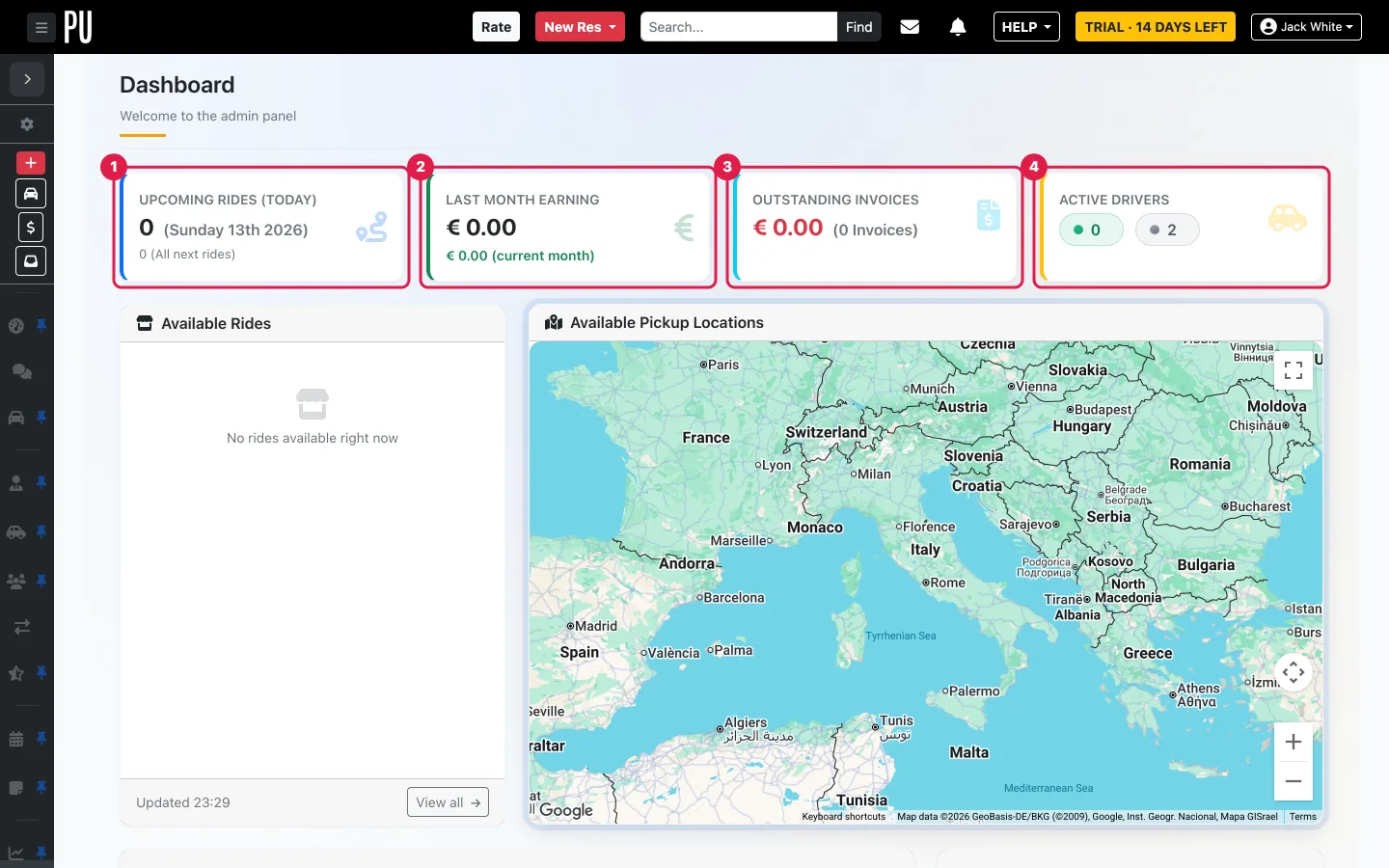
The Dashboard opens on the essentials: (1) today's upcoming rides, (2) last month's earnings, (3) outstanding invoices, (4) active drivers, plus the list of available rides and a map of your pickup locations.
The Dashboard of a new workspace.
What you can do with it
1
Reservations & Dispatch: create and follow every ride on the Dispatch grid, assign drivers and vehicles, print the day sheet, and see everything on the Calendar.
2
AI booking assistant: paste a text, an email or a WhatsApp message and let the assistant draft the reservation for you.
3
Smart quotes: send a quote by email with a confirm option and a payment link included.
4
Rate engine: vehicle-based pricing with fixed rates, distance rates and hourly rates, plus peak, seasonal, holiday and time-of-day adjustments.
5
Driver pay: pay drivers per trip or per distance; drivers see their rate in the app when you enable it in Settings.
6
Pickup Driver app, available on the App Store and Google Play: real-time GPS, push notifications, live reservation updates, expenses, and a ride flow (on the way, arrived, passenger on board, ride completed). A driver web portal is included.
7
Vehicles: preset vehicle types and your fleet, with documents, maintenance and incidents.
8
Accounts: individual customers, companies and passengers.
9
Finance: settle rides, invoices and receivables, manual or automatic payments, payment requests with Stripe, Revolut and other payment solutions, driver payouts and financial reports.
10
Calendar sync (iCal): reservations on your iPhone or Android calendar in real time with full details; custom calendars for corporate clients or drivers; a scheduled manifest by email so you always have a copy of upcoming rides.
11
Flight tracking: real-time flight status on airport rides.
12
Google Maps built in: address search that limits typing errors.
13
Partner network: farm rides in and out with other companies through PU Net, or offer them to groups of companies by location on PU Exchange, the marketplace where the first company to accept wins the ride; plus integrations with the largest OTAs and international networks.
14
Feedback engine: after every ride, customers rate the driver, the vehicle and the overall service, with questions you customize.
15
Company setup & tools: email brand kit and templates, resources, lists, settings, and import of reservations from your previous system.
Plans and add-ons
Features are grouped in plans and optional add-ons. Plans & Addons → Plans shows what your plan includes and how to change it; Billing shows your renewal, payment method and invoices. The number of vehicles and drivers you can create depends on your plan.
Who is it for?
Operators of any size: from an owner-operator with one car to a fleet running hundreds of rides a week. If you move people professionally, Pickup Dispatch is built for you.
Your first hour
Set up your workspace in the order a real operation needs:
We use cookies
We use cookies to improve your experience, analyse site usage, and remember your preferences. You can choose which categories to allow.
Cookie Policy
Manage preferences
Strictly necessaryRequired for the website to function. Cannot be disabled.
Always on
Cookie
Provider
Duration
Purpose
pickup_public_session
pickupdispatch.com
Session
Maintains your session state and security across page requests.
XSRF-TOKEN
pickupdispatch.com
2 hours
Security token to prevent cross-site request forgery on form submissions.
pickup-theme
pickupdispatch.com
1 year
Stores your dark/light mode preference across visits.
pickup_locale
pickupdispatch.com
1 year
Remembers your selected language.
pickup_consent_v1
pickupdispatch.com
6 months
Stores your cookie consent preferences (localStorage).
pickup_consent
pickupdispatch.com
6 months
Stores your cookie consent preferences (cookie fallback).
AnalyticsHelp us understand how visitors use the site. All data is anonymised.
Cookie
Provider
Duration
Purpose
_analytics_id
Analytics provider
13 months
Identifies unique visitors. IP address anonymised before processing.
_analytics_session
Analytics provider
Session
Tracks session-level page views and interactions for analytics reports.
 Watch the demo (2 min)