If you operate in more than one city, for example Dubai, New York and Paris, you do not have to charge the same price per kilometer everywhere. In Rates you can create a distance rate matrix for each city or zone and give it its own prices.
In the sidebar, under System Setting, click Rates. In the Rate Matrix tab, click Create Matrix.
2
Enter a Matrix Name, for example the name of the city, and choose Distance in Rate Matrix Type.
3
Under Service area, select the city or zone and click Add area. You can add more than one.
4
Click Create Matrix.
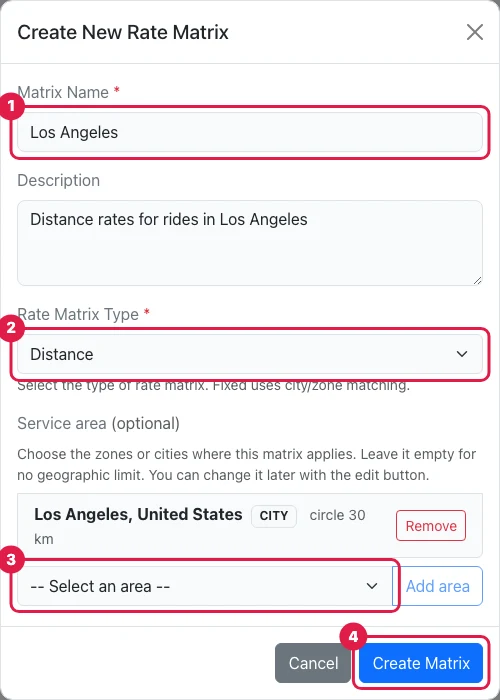
(1) Name, (2) type Distance, (3) the city or zone, (4) Create Matrix.
Enter the prices
Open the Distance Rate tab, choose the matrix in Select Distance Rate Matrix and enter its prices. On the same tab, the Service area card shows the cities and zones of the matrix: you can add or remove them at any time.
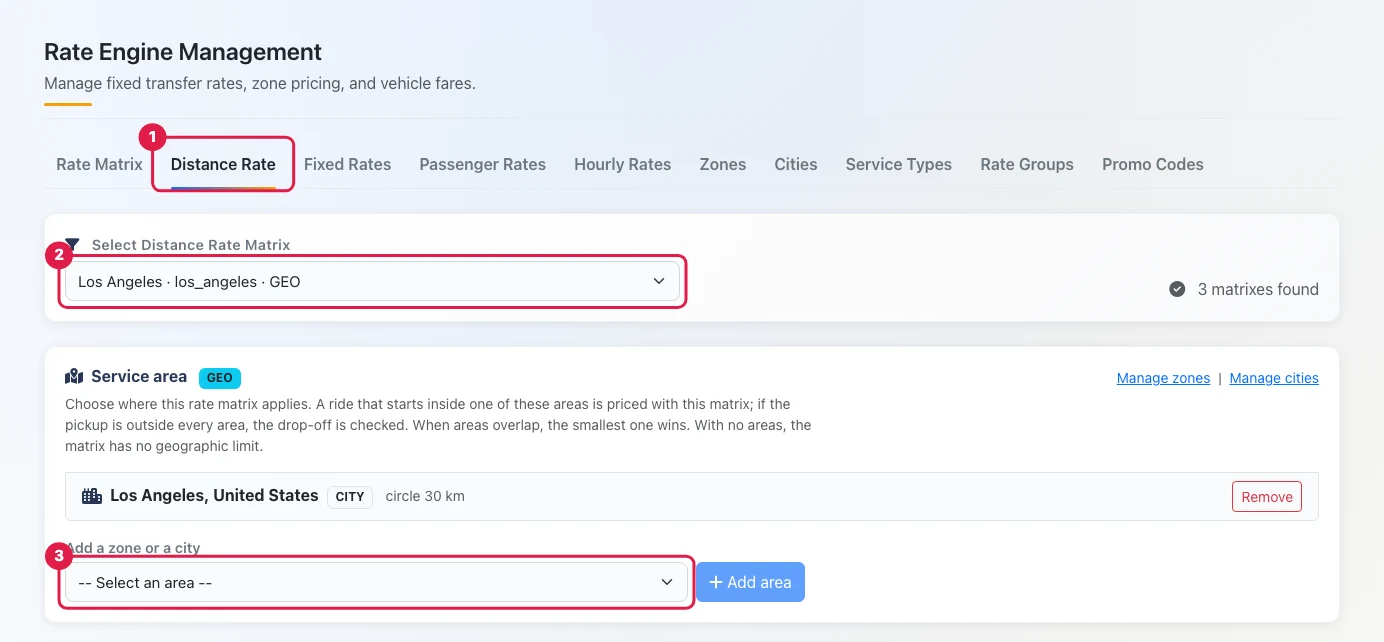
(1) Distance Rate tab, (2) the matrix of the city, (3) add another zone or city.
Repeat these steps for every city or zone where you want different distance rates.
Need help? Open a free support ticket from HELP → Open a ticket in your workspace and follow the answers in HELP → My tickets.
Was this article helpful?
Thanks for your feedback. It helps us improve.
We use cookies
We use cookies to improve your experience, analyse site usage, and remember your preferences. You can choose which categories to allow.
Cookie Policy
Manage preferences
Strictly necessaryRequired for the website to function. Cannot be disabled.
Always on
Cookie
Provider
Duration
Purpose
pickup_public_session
pickupdispatch.com
Session
Maintains your session state and security across page requests.
XSRF-TOKEN
pickupdispatch.com
2 hours
Security token to prevent cross-site request forgery on form submissions.
pickup-theme
pickupdispatch.com
1 year
Stores your dark/light mode preference across visits.
pickup_locale
pickupdispatch.com
1 year
Remembers your selected language.
pickup_consent_v1
pickupdispatch.com
6 months
Stores your cookie consent preferences (localStorage).
pickup_consent
pickupdispatch.com
6 months
Stores your cookie consent preferences (cookie fallback).
AnalyticsHelp us understand how visitors use the site. All data is anonymised.
Cookie
Provider
Duration
Purpose
_analytics_id
Analytics provider
13 months
Identifies unique visitors. IP address anonymised before processing.
_analytics_session
Analytics provider
Session
Tracks session-level page views and interactions for analytics reports.